

ayatec logo
Home Store Blog Contact
unicontrol user guide by ayatec
Home Store Blog Contact

Topics

  1. Welcome
  2. Getting started
    1. What is unicontrol
    2. How it works
    3. Connectivity
    4. Integration options
    5. Basic I/O
    6. Special I/O
    7. Special inputs - Digital sensors
    8. Special outputs - RGB driver
    9. Special outputs - Audio driver
    10. Network API - HTTP
    11. Network API - MQTT
    12. Network security
    13. Downloads
  3. Web Interface
    1. Processes
      1. Process
      2. Name
      3. Main state
      4. Initial state
      5. Display
      6. Constraints
        1. Process timer
        2. Variable contraints
        3. Force output
      7. Input
        1. Input source
        2. Channel
        3. Control period
        4. Value
        5. Publish
        6. Frequency
        7. Subtopic
      8. Events
        1. On/Off event
        2. Condition
        3. Idle/running time
        4. Delay on/off
        5. Fade in/out
        6. High/low input
        7. Mid point/Tolerance
        8. Out on when
      9. Output
        1. Primary output
        2. Action
        3. Type
        4. Invert
        5. Duty cycle
        6. Mem value
        7. High/low output
        8. Folder/Track
        9. RGB mode
        10. RGB color
        11. RGB brightness
        12. RGB speed
        13. Publish
        14. Subtopic
        15. Secondary outputs
      10. Cycle
        1. Cycles
        2. High/Low phase
      11. On/Off button
    2. Peripheral
      1. Hardware
      2. Type
      3. Calibration
      4. Mapping (edit)
      5. IR remote (edit)
      6. Impulse_counter (edit)
      7. RGB driver (edit)
      8. DS18B20 (edit)
    3. Device
    4. Network
    5. System
    6. License
  4. Tutorials
    1. First boot
    2. First process
    3. Connect to MQTT
    4. Process sequencing

    5. DIY Project: Bath Fan

In this article

  • Introduction
advert
unicontrol > Web interface > Processes > Cycle > High/Low phase

High/Low phase

High phase and Low phase define how long will the process' output remain in the HIGH and LOW states within a single Cycle. The two are independent from each other and only take effect if both are set to a non-zero value.
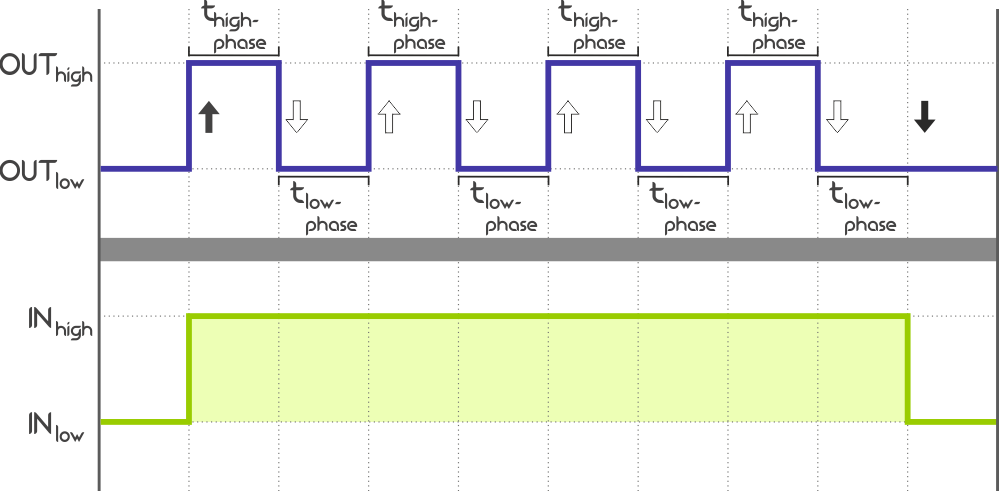
Cycler

The High/Low phase periods, as all other time period variables, are provided in two parts: Quantity and Unit:

Quantity

The first parameter listed is the Quantity which defines how many time units will have to elapse before the process output reacts to the input event. Its [VALUE] can be anywhere between 0 and 255.

Unit

The second parameter listed is the Unit which defines the time measurement unit of the provided Quantity. Available [VALUE] options are summarized in the following table:

[VALUE] Unit
0One tenth (0.1) of a second
1One second
2Ten seconds
3One minute
4Ten minutes
5One hour

Thus, effectively, the provided time period can range between 0.1 second and 255 hours.

HTTP

The device will accept HTTP requests at the following URLs related to:

  • High phase Quantity:

(POST) http://[IPv4]/var_set?param=cyon_[PROCESS ID]&val=[VALUE]
(GET) http://[IPv4]/var_request?param=cyon_[PROCESS ID]

  • Low phase Quantity:

(POST) http://[IPv4]/var_set?param=cyoff_[PROCESS ID]&val=[VALUE]
(GET) http://[IPv4]/var_request?param=cyoff_[PROCESS ID]

  • High phase Unit:

(POST) http://[IPv4]/var_set?param=cyonu_[PROCESS ID]&val=[VALUE]
(GET) http://[IPv4]/var_request?param=cyonu_[PROCESS ID]

  • Low phase Unit:

(POST) http://[IPv4]/var_set?param=cyoffu_[PROCESS ID]&val=[VALUE]
(GET) http://[IPv4]/var_request?param=cyoffu_[PROCESS ID]

A combination of:

POST: http://192.168.1.255/var_set?param=cyon_11&val=3
POST: http://192.168.1.255/var_set?param=cyonu_11&val=1

will set the High phase time for Process #11 cycles to 3 seconds.

Learn more in HTTP API.

MQTT

This parameter cannot be accessed via MQTT. Learn more in MQTT API.

© 2024 ayatec.eu • Found a mistake?  Let us know!