Condition
Defines the Condition for the On event (inval1) or the Off event (inval2),
the satisfaction of which will trigger an output action. The interface consists of several elements:
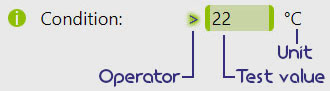
- Operator - defines the expected relation between the primary Input reading and the test value.
If the reading is analogue, then the operator signifies inequality and can be changed by clicking on it in the interface.
The default operator is
<(less) and corresponds to[VALUE]=0, while[VALUE]=1represents>(greater). If the reading is logical then the operator automatically changes to=(the choice of operator then has no effect). - Test value - threshold for the inequality or the expected value for the equality. Any
[VALUE]between-9999and+9999* can be provided. - Unit - represents the measurement unit, either defined by the user or implied from the input choice, and is for informational purposes only as it does not affect the process in any way.
-999.9 and +999.9, one decimal digit can be added to the integer part.
The decimal part is automatically truncated if the value is outside of this range.Two independent Conditions can be defined, one for switching the output ON and another for switching the output OFF:


A Control period, Delays, and Faders* apply.
HTTP
The device will accept HTTP requests at the following URLs related to:
- Condition on threshold:
(POST) http://[IPv4]/var_set?param=inval1_[PROCESS ID]&val=[VALUE]
(GET) http://[IPv4]/var_request?param=inval1_[PROCESS ID]
- Condition on operator:
(POST) http://[IPv4]/var_set?param=oncdsgn_[PROCESS ID]&val=[VALUE]
(GET) http://[IPv4]/var_request?param=oncdsgn_[PROCESS ID]
- Condition off threshold:
(POST) http://[IPv4]/var_set?param=inval2_[PROCESS ID]&val=[VALUE]
(GET) http://[IPv4]/var_request?param=inval2_[PROCESS ID]
- Condition off operator:
(POST) http://[IPv4]/var_set?param=offcdsgn_[PROCESS ID]&val=[VALUE]
(GET) http://[IPv4]/var_request?param=offcdsgn_[PROCESS ID]
POST: http://192.168.1.255/var_set?param=inval2_3&val=21
POST: http://192.168.1.255/var_set?param=offcdsgn_3&val=1
will cause the heater on Process #3 to turn off if the temperature reading surpasses
21°C.
Learn more in HTTP API.
inval1 and inval2 are shared with the High/Low input and the Deadband Mid point and Tolerance.MQTT
This parameter can also be accessed via MQTT using [PARAMETER] = inval1, inval2, oncdsgn and offcdsgn. Learn more in MQTT API.
Topic: johndoe5896/home/garagedoor/sub/process_3/inval2
Payload: 21
Topic: johndoe5896/home/garagedoor/sub/process_3/offcdsgn
Payload: 1
will cause the Process #3 to turn off the heater attached to it if the temperature reading surpasses
21°C.
Example
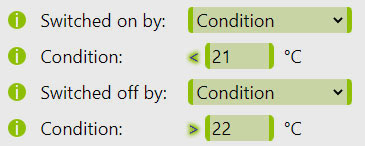
The following example process will behave as a standard thermostat. The output will be turned ON once the temperature falls below 21°C and turned OFF when the reading rises above 22°C.
Condition satisfaction of which will result into an output action. The interface consists of several elements: