

Secondary outputs
In addition to the Primary output of a given process (i.e. the calling process or primary process), up to three additional Secondary outputs can be selected to react to the Switch event. Instead of being defined directly as is the Primary output, these outputs are represented by other processes, inheriting parameters of the respective processes' (i.e. the called process or secondary process) Primary output and Constraints.
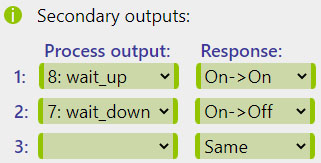
The Secondary outputs are, however, only triggered when following two conditions are met:
- The calling process' output is being called directly. If the process was called indirectly as the Secondary output of another process, its own Secondary outputs are not triggered.
- Scenario 1: A is switched
ON(manually or automatically):
With no Primary output defined, the action only affects the Secondary outputs. A (the calling or primary process in this context) has process B (the called or secondary process) defined as its secondary output. As a result, theD2peripheral, designated as B's Primary output, will be switchedON. However, because B was invoked indirectly as a Secondary output itself, its own Secondary outputs, including process C, will NOT be triggered. - Scenario 2: B is switched
ON(manually or automatically):
In this context, process B is triggered directly as the calling process. As a result, not only the B's Primary output (D2), but also its Secondary output (D3) is switchedONthis time. However, if process C (the called process) had Secondary outputs defined, they would not be invoked, similar to the previous case, as its outputs were only called indirectly. - The called process' Constraints are satisfied at the moment it is called.
D2 peripheral as its Primary and process C as its Secondary output.
Lastly, process C only has a Primary output D3:
| Process | Primary output | Secondary output |
|---|---|---|
| 1: A | - | => B, same action |
| 2: B | D2 | => C, same action |
| 3: C | D3 | - |
D3 will only be switched ON if the Constraints
defined in process C (the called process) are satisfied at that specific moment (not bypassed by the manual commands).
Please note that the Constraints defined in process B effectively apply to both
D2 and D3 in the same way
and are effectively ignored by both if the initial command was provided manually.
It is worth noting that it is not necessary to have the Primary output defined in order to utilize the Secondary outputs. This may be a desirable practice in specific applications.
Response
The actions performed with the Secondary outputs, unlike the Primary output, are not directly predetermined by an On or Off Event. Each Secondary output can react to the original event in any specific way, selected in the Response option as summarized in the table below.
0 representing an Off event and 1 representing an On event.
| [VALUE] | Secondary Action | Primary Output Action | |
|---|---|---|---|
| Label | ON | OFF | |
1 | Same Action | ON | OFF |
2 | Opposite Action | OFF | ON |
3 | On -> On (only) | ON | - |
4 | On -> Off (only) | OFF | - |
5 | Off -> Off (only) | - | OFF |
6 | Off -> On (only) | - | ON |
7 | Action -> On | ON | ON |
8 | Action -> Off | OFF | OFF |
Process 1:
Process 1 is turned ON with this setup, the output of Process 8 will also turn ON,
as long as the Constraints associated to Process 8 are met.
Similarly, the output of Process 7 is turned OFF when its associated Constraints are met.
Vice versa, when Process 1 is turned OFF, the outputs of Processes 7 and 8 will not be directly affected.