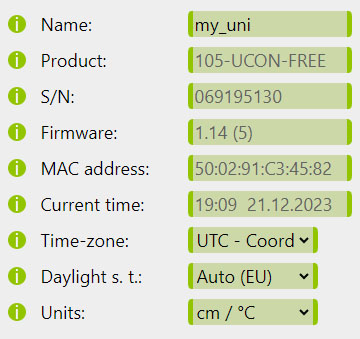
In the Device menu you may display basic device info and set-up the basic device parameters and internet security.
Device settings
Displays the device hardware info and allows to set the name and time-zone of the device.
Device settings
Parameter ([API name])
Default value
[VALUE]
Description
Name (devicename)
my_uni
String of up to 25 characters
Name of the device used for its easier identification in the network. It is also used as an SSID in case of the Wi-FiAP mode.
Product
- (passive information)
Official product code of the ayatec firmware present of the device.
S/N
The ayatec serial number of the device.
Firmware
Version of the ayatec firmware currently present on the device.
MAC address
A unique physical identifier of the ESP8266 Wi-Fi network module.
Current time
Real time clock of the device.
Time-zone (timezone)
0 (UTC)
selection of integer between -12 and 30
Time-zone relative to UTC in which the device's real time clock should be referenced.
(Changed to a drop-down selection in version 1.06)
DST (dst)
2 (Auto [EU])
0 for Inactive or 1 for Active or 2 for Auto (EU) or 3 for Auto (US) or 4 for Auto (Aus) or 5 for Auto (NZ)
When Daylight Saving Time is Active or Auto with the current date falling within a predefined date range valid for the respective region, an extra hour is added to the device's real-time clock. Changes effective immediately.
(Introduced in version 1.06, Auto functionality added in version 1.14)
Units (unit)
0 (in/°C)
0 for cm/°C or 1 for in/°F or 2 for cm/°F or 3 for in/°C
Chooses between Imperial and SI (International System of Units) measurement units.
(Introduced in version 1.14)
Autoreset (autorst)
1 (Every day)
0 for none or 1 for Every day or 2-8 for Monday to Sunday, respectively
Select the day(s) and the hour when the auto-reset will occur.
(Introduced in version 1.17)
Autoreset time (autorsttime)
3 (03:00)
0 - 23, corresponding to the full hours of the day.
Please, find below the available time-zone options:
[VALUE]
Time-zone
-12
UTC-12:00 - International Date Line West
-11
UTC-11:00
-10
UTC-10:00 - Hawaii
20
UTC-09:30 - Marquesas Islands
-9
UTC-09:00 - Alaska
-8
UTC-08:00 - Pacific Time (US & Canada)
-7
UTC-07:00 - Mountain Time (US & Canada)
-6
UTC-06:00 - Central Time (US & Canada)
-5
UTC-05:00 - Eastern Time (US & Canada)
-4
UTC-04:00 - Atlantic Time (Canada)
21
UTC-03:30 - Newfoundland
-3
UTC-03:00 - Argentina, Brazil, Uruguay
-2
UTC-02:00
-1
UTC-01:00 - Azores, Cape Verde Is.
0
UTC - Coordinated Universal Time (default)
1
UTC+01:00 - Central European Time
2
UTC+02:00 - Eastern European Time
3
UTC+03:00 - Moscow, St. Petersburg, Volgograd
22
UTC+03:30 - Iran Standard Time
4
UTC+04:00 - Abu Dhabi, Muscat
23
UTC+04:30 - Afghanistan
5
UTC+05:00 - Islamabad, Karachi
24
UTC+05:30 - India Standard Time
25
UTC+05:45 - Nepal
6
UTC+06:00 - Almaty, Dhaka
26
UTC+06:30 - Yangon (Rangoon)
7
UTC+07:00 - Bangkok, Jakarta, Hanoi
8
UTC+08:00 - Beijing, Hong Kong, Singapore
27
UTC+08:45 - Eucla (Australia)
9
UTC+09:00 - Tokyo, Seoul
28
UTC+09:30 - Central Australia Time
10
UTC+10:00 - Eastern Australia, Guam
29
UTC+10:30 - Lord Howe Island
11
UTC+11:00 - Solomon Is., New Caledonia
12
UTC+12:00 - Auckland, Wellington
30
UTC+12:45 - Chatham Islands
13
UTC+13:00 - Nuku'alofa
14
UTC+14:00 - Line Islands
Security settings
Security settings
Parameter ([API name])
Default value
[VALUE]
Description
Password (masterpass)
passw123
String of up to 25 characters
Device administrator password for extended access. This password is also used to access the device in Wi-FiAP mode, but needs to be at least 8 characters long to work properly. Learn more...
Origin (CORS) (origin)
null
String of up to 45 characters
Origin of the web interface from which the device will be accessed. Keep null when using an offline local copy of the interface or the app.
Web protection (secure)
Disabled
0 for Disabled or 1 for Enabled
Allow or disable password protection for web access. Only keep this Disabled if the device is not accessible outside of your secure and trusted network. Learn more...
Extended serial (serial)
Enabled
If physical access to the device is not adequately restricted, the user can use this setting to disable printing of extended debug messages and accepting user commands through the Serial port. Learn more...
Display (display)
Show all
0 for Show all or 1 for Hide system info or 2 for Hide all
If physical access to the device is not adequately restricted, the user can use this setting to hide either System or All information from the Display loop.
(Introduced in version 1.06)
HTTP
The device will accept HTTP requests at the following URLs: